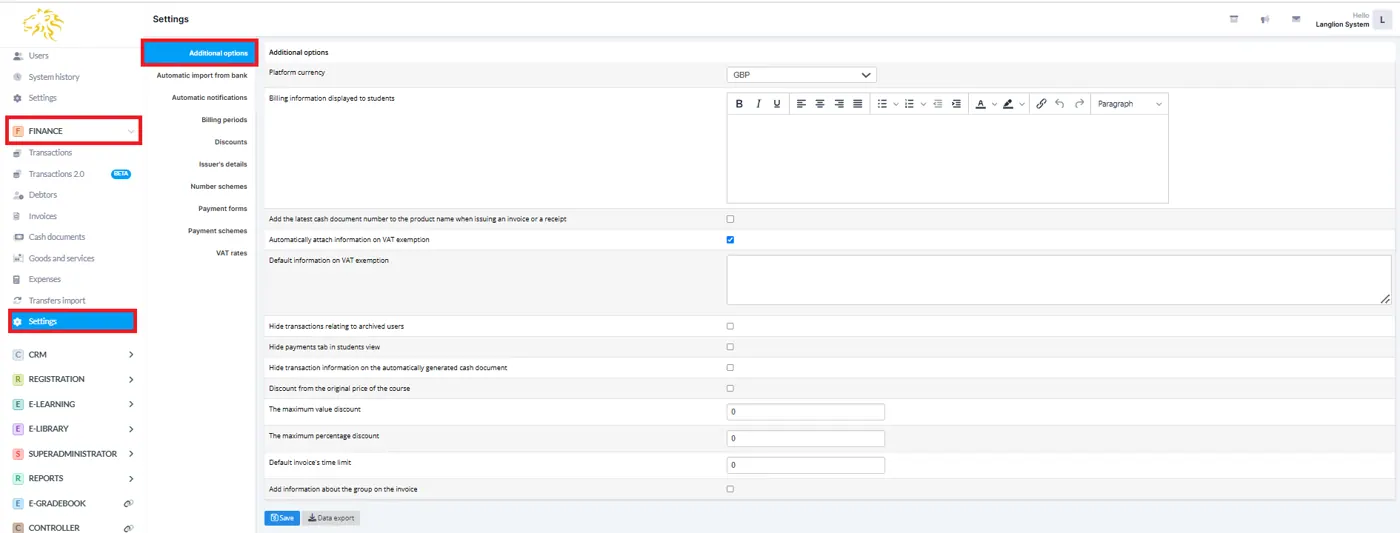
Additional functionality of the "Finance" module complements its basic operation. In the "Additional options" tab you can configure the following features:
- Set the "Platform currency" – it applies throughout the system for billing users
- Prepare the content of the "Billing information displayed to students" field – students see it in their panel above the payment details
- "Add the latest cash document number to the product name when issuing an invoice or a receipt" – the cash document number will additionally be printed on the invoice (visible when cash documents are enabled in the system)
- Are your school's services exempt from VAT? Select "Automatically attach information on VAT exemption" and enter the text in the "Default information on VAT exemption" field. It will be shown on invoices without VAT (visible when invoices without VAT are enabled)
- Do you add a lot of payments to the system? It may slow down. Enable "Hide transactions relating to archived users" – the system will be relieved and the transactions of archived students will be moved to the archive. To view them, switch on the archive view
- Do you want cash documents to show the student's data rather than their parent's? Enable "Put student's data on the automatically generated cash transaction" (available when parent accounts are enabled in the system)
- If you do not want students to see their payments, enable "Hide payments tab in students view"
- Don't want transaction descriptions printed on cash documents? Enable "Hide transaction information on the automatically generated cash document"
- Set "The maximum value discount" and "The maximum percentage discount", and decide whether the discount is deducted from the original price of the course – option "Discount from the original price of the course"
- Set "Default invoice's time limit" (in days). The system sets 14 days to pay an invoice by default, but you can change it to any number of days
- Enable "Add information about the group on the invoice"
Click "Save" to save the settings.