
After changing the teacher's rate in the generator and clicking "Generate classes", the rate was not saved in some lessons.
The rate does not change in some lessons on the list of classes because those classes have been modified. Every action performed on the list of classes (adding a lesson to the list manually, giving classes a status, adding an online lesson, etc.) modifies the classes. A teacher who enters class details and checks attendance also modifies the classes.
One of the safeguards of the classes generator is that it does not make changes to modified classes (it also skips classes already settled with the teacher). You can, of course, make changes manually on the list of classes even if they have been modified.
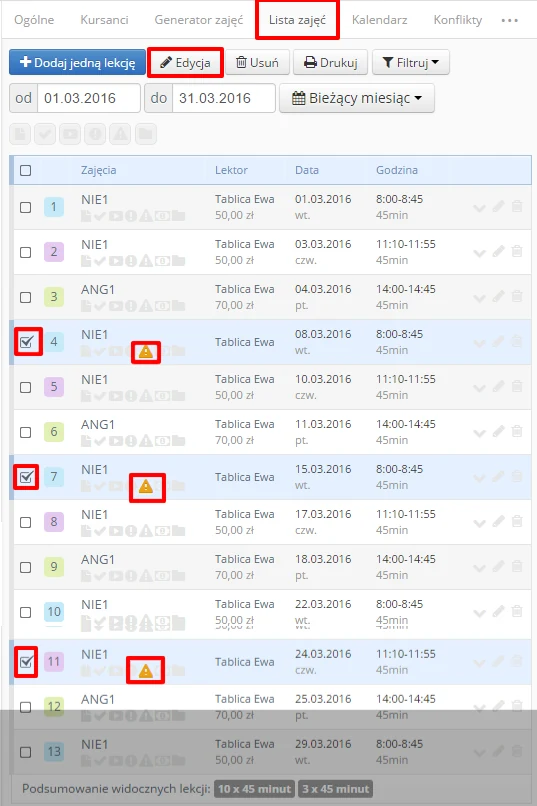
How do I make changes to modified classes?
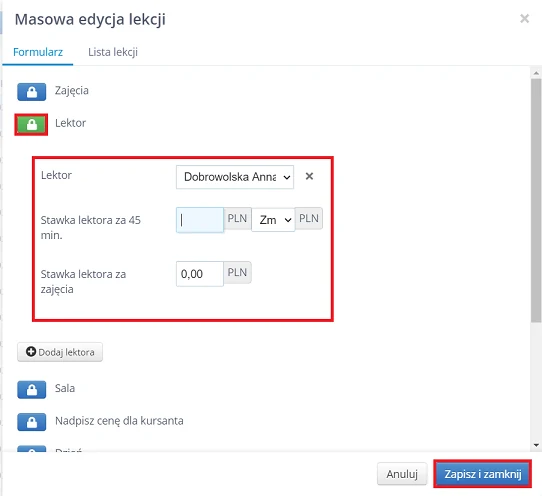
The safest way is to change the rate with bulk editing, because the classes keep their attendance, details and statuses. On the group's list of classes, select the modified classes (hover over a class to see why it was modified) and click Edit. In the Edit classes window, unlock the teacher field (padlock icon), enter the new rate and save. If you select only one class, the edit window of that single class opens.
You can do the same in the Lessons beta tab: in the filters, select the Lesson was modified marker (next to the rate you can also see whether it differs from the generator rate), select the classes and use bulk editing.
The unlocked teacher field replaces all teachers in the selected classes. If several teachers run the classes, enter all of them. Do not change the rate in classes already settled with the teacher.
Deleting classes and generating them again makes sense only for future classes with no attendance, no class details, no status or substitution, and no settlement with the teacher or students. Deleting hides all this data together with the classes, and the generator then creates new, empty classes in their place – only if the date falls within the date range set in the generator.