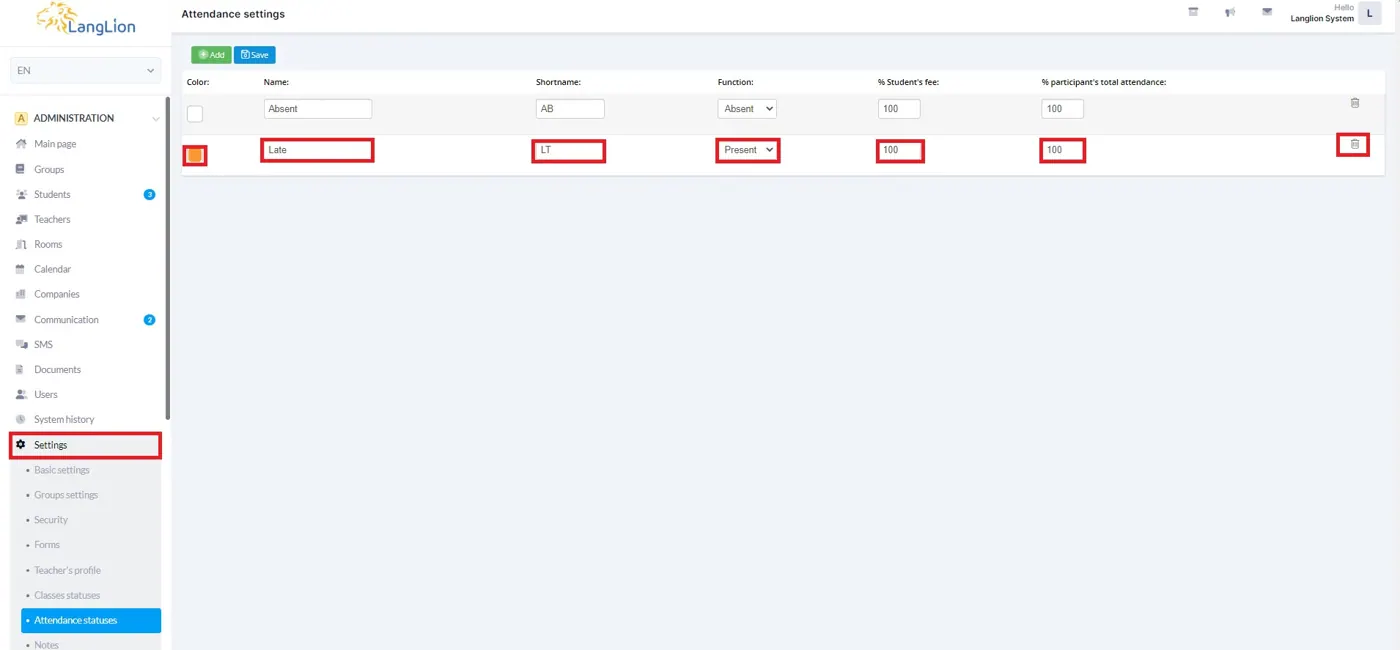
The attendance status option is used when checking the attendance of students in the class. By default, the LangLion Platform has two presence statuses – absent and late.
As an administrator, you have the ability to define additional presence statuses.
How to add attendance status?
- Click on the Settings tab of the Administration module.
- Select the Classes subtab, then Attendance statuses.
- Click on Add.
When defining a new presence status, assign:
- Color, in order to distinguish among other statuses and legibility in the printout of attendance,
- Name,
- Shortened name – will be included in the attendance printout,
- Function – present, absent or not counted in attendance,
- % of the student’s fee – the status affects the hourly type of settlement,
- % participant’s total attendance – taken into account in the student attendance report
When you have finished defining the attendance statuses, click Save.
Done, status has been added to the system.