
The main administrator can add users who will manage the system. If you have the permission to manage users, you can also grant and edit their permissions. Permissions are granted depending on the duties the user will perform. You can change them in "Administration" -> "Users" -> "Permissions" by selecting the person whose permissions you want to change.
Use the "Add all" and "Remove all" buttons to grant or remove all permissions at once. You cannot edit your own permission settings – another administrator with the "Users management" permission has to do it.
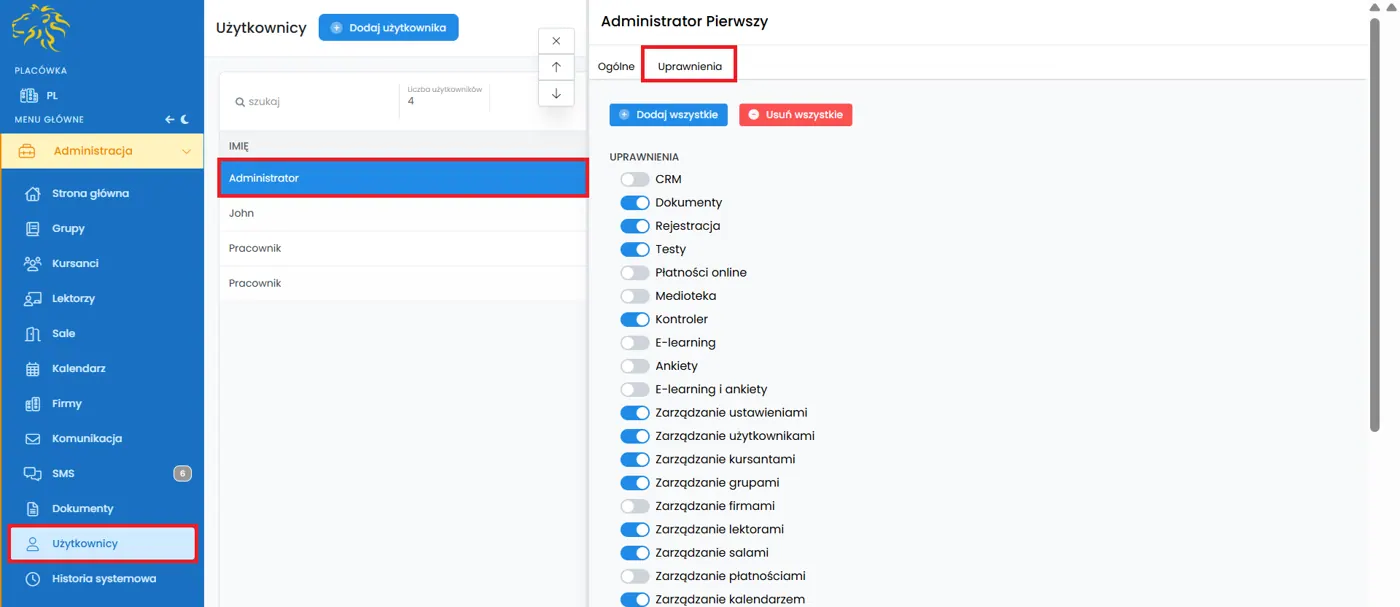
Check which functions are available after granting each permission:
- adding, editing and removing people in CRM,
- creating tasks,
- adding notes on the timeline of students, companies and people.
Module Documents
- creating templates of student's contracts, student's certificates, other documents, contracts for specific work, contracts of mandate, bills for contracts, company contracts,
- generating documents.
- managing registration forms,
- building registration forms,
- access to registration settings.
Module Tests
- creating tests,
- editing questions in a test,
- sharing a test,
- deleting a test,
- access to test results.
- configuring the Online payments module (PayU, Tpay, PayPal).
- adding items to the E-library,
- deleting E-library items,
- creating signatures for E-library items,
- lending and returning signatures,
- access to reserved E-library items,
- printing a list of overdue items,
- printing library cards,
- archiving E-library items,
- configuring E-library settings – adding publishers and item types, creating prefixes, setting the default number of reservation days and the number of digits in the prefix.
- creating new tests,
- editing tests,
- deleting tests,
- assigning labels to tests,
- sharing tests with teachers,
- access to test results,
- managing files uploaded to the Platform (adding, deleting, moving between folders, sharing with groups).
- creating surveys,
- sharing surveys,
- editing surveys,
- deleting surveys,
- access to survey results.
Module E-learning and surveys
- applies to packages in which surveys are part of the E-learning module – it covers the e-learning and surveys described above.
- managing the settings of the "Administration" module,
- basic settings,
- group settings,
- forms,
- classes statuses,
- attendance statuses,
- notes,
- classes details,
- semesters,
- grading,
- communication.
Users management
- adding users,
- removing users,
- viewing the user's login,
- editing the user's access data,
- granting permissions to users.
Students management
- adding and editing students,
- editing access and billing data,
- printing access data,
- sending access data to the student's e-mail address,
- displaying the one-time password and login of the student and their parent,
- access to the student's history,
- removing students.
Groups management
- creating groups,
- editing groups,
- archiving groups,
- copying groups,
- generating classes in groups,
- adding classes to the list of classes and deleting them,
- editing classes on the list of classes,
- access to the group's calendar,
- managing conflicts in a group,
- deleting groups.
Companies management
- adding companies,
- editing company data,
- editing and sending companies' access data,
- assigning students to companies,
- assigning groups to companies,
- settling companies,
- archiving companies,
- deleting companies.
Teachers management
- adding teachers,
- editing teacher's data,
- archiving,
- assigning teachers to classes,
- assigning teacher's rates to classes by rate name (without seeing their values unless the "Teacher's salaries" permission is granted),
- preparing a report of teachers' working hours,
- sending messages to teachers.
Rooms management
- adding rooms,
- editing rooms,
- deleting rooms,
- archiving rooms.
Payments management
- access to transactions,
- settling students,
- granting discounts,
- generating students' instalments,
- managing invoices,
- managing cash documents,
- managing products,
- settings of the "Finance" module,
- list of debtors,
- expenses.
- viewing the calendar – access to the timetable,
- printing the calendar,
- access to the "Home page" tab.
- entering public holidays and days off,
- entering events,
- choosing the groups to which a day off applies,
- printing the list of holidays and days off.
- access to the news box on the home page,
- creating news.
Access to messages
Creating and sending:
- managing classes and lesson topics,
- access to students' attendance,
- checking attendance,
- access to students' grades,
- access to groups and information about students,
- creating and sending messages,
- adding online lessons,
- editing classes in groups,
- login history.
- preparing various reports, e.g. an invoice report, cash documents, a list of students,
- creating report templates.
Teacher's salaries
- preparing teachers' settlements,
- seeing the values of teachers' rates.
Teachers access details
- editing the teacher's login and password,
- sending access data to the teacher's e-mail address.
Log in to users accounts
- logging in to a student's/parent's account,
- logging in to a teacher's account,
- logging in to a company's account.
Settlements with LangLion
- access to settlements and invoices for using the LangLion Platform.
Module controller
- access to the Controller module (if the school has it in its package).
Admins' profile data update
- editing data in administrators' profiles.
Offers management
- managing offers in the Registration module.
Orders management
- managing orders in the Registration module.