
Attendance is counted from the student's enrolment date in the group. When you enrol a student in a group (status "Enrolled"), the system sets the enrolment date to that day. If the "Date of enrollment" field is empty (e.g. for students enrolled long ago or imported), the system counts attendance from the group's start date – as if the student had attended from the start of the course. Check the enrolment date and fill it in or correct it if needed (e.g. when the student actually started classes on a different day than the day they were enrolled in the system).
How do I enter a student's enrolment date in a group?
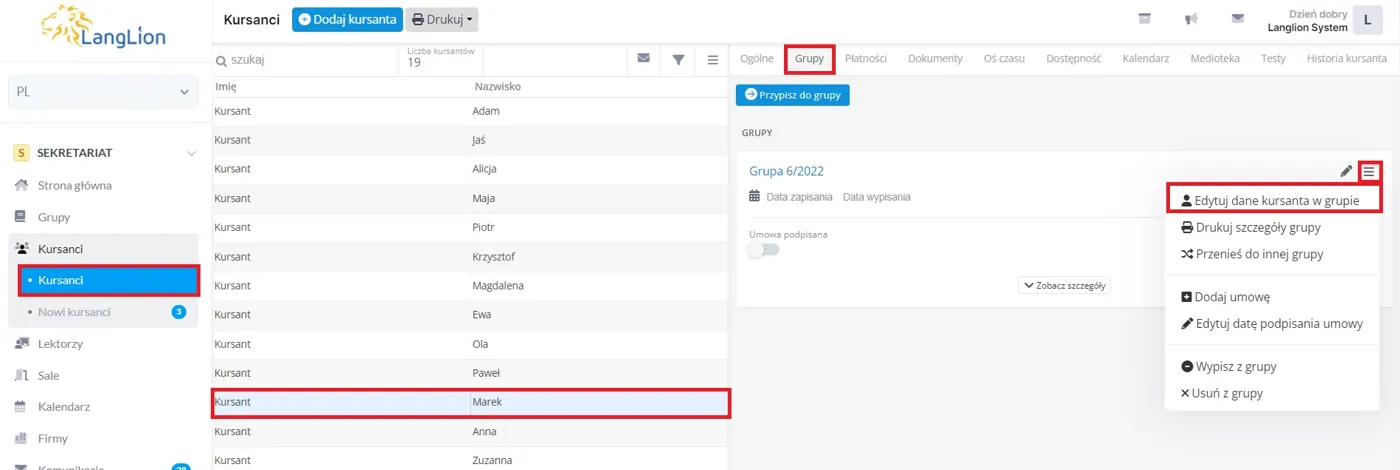
1. Select the student.
2. Go to the "Groups" tab.
3. Click the "More" menu and select "Edit data of student in a group".
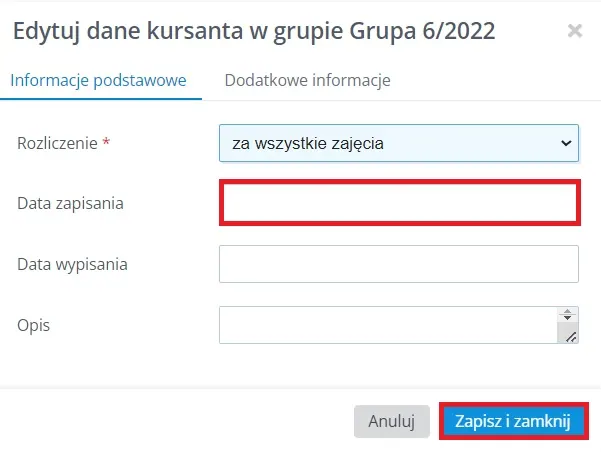
4. Enter the enrolment date and save the changes.
You can also change the date directly in the "Date of enrollment" field on the group card in the "Groups" tab – without opening the window.
Done – the enrolment date has been filled in. From now on, attendance will be counted from the actual enrolment date.