
The rate does not change in some lessons on the list of classes because those classes have been modified. Every action performed on the list of classes (adding a lesson to the list manually, giving classes a status, adding an online lesson, etc.) modifies the classes. A teacher who enters class details and checks attendance also modifies the classes.
One of the safeguards of the classes generator is that it does not make changes to modified classes (it also skips classes already settled with the teacher). You can, of course, make changes manually on the list of classes even if they have been modified.
How do I make changes to modified classes?
If the modification is not the result of, for example, checking attendance, giving the classes a status or filling in class details, you can delete these lessons and generate them again.
This way, the generator will put the lessons on the timetable exactly as they were planned.
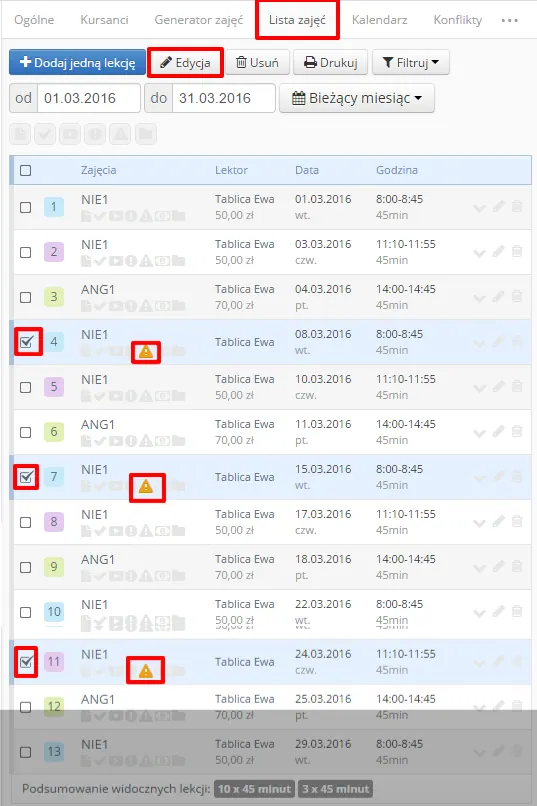
If you cannot delete the lessons because you do not want to lose the changes made to them, simply select the modified classes on the list of classes and click the Edit button. Then, in the Edit classes window, unlock the option you need (padlock icon), enter the new information and save the changes. If you select only one class, the edit window of that single class opens.
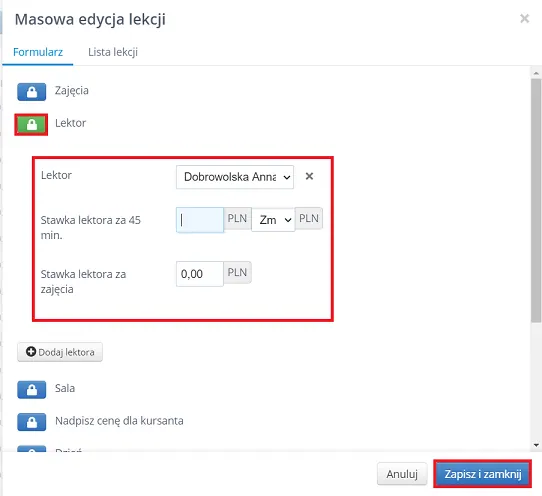
Done – the new information has also been applied to the modified classes.